Two Joomla Page Builders Hit with CVSS 10.0 RCE — Actively Exploited
Same week. Same severity score. Same attack class. Two completely separate Joomla page builder extensions — SP Page Builder by JoomShaper and Page Builder CK by Joomlack — each received a CVSS 10.0 unauthenticated remote code execution disclosure, and both are already being exploited in the wild. CISA added them both to its Known Exploited Vulnerabilities catalog on July 7, with a patch deadline of July 10. That deadline has passed. Sites that haven't updated are actively being compromised right now.
What's Broken and How Attackers Are Getting In
Both vulnerabilities share the same root class: a front-end file upload endpoint with no authentication and no file-type restriction. The details diverge slightly, which is worth understanding because the IOCs differ between them.
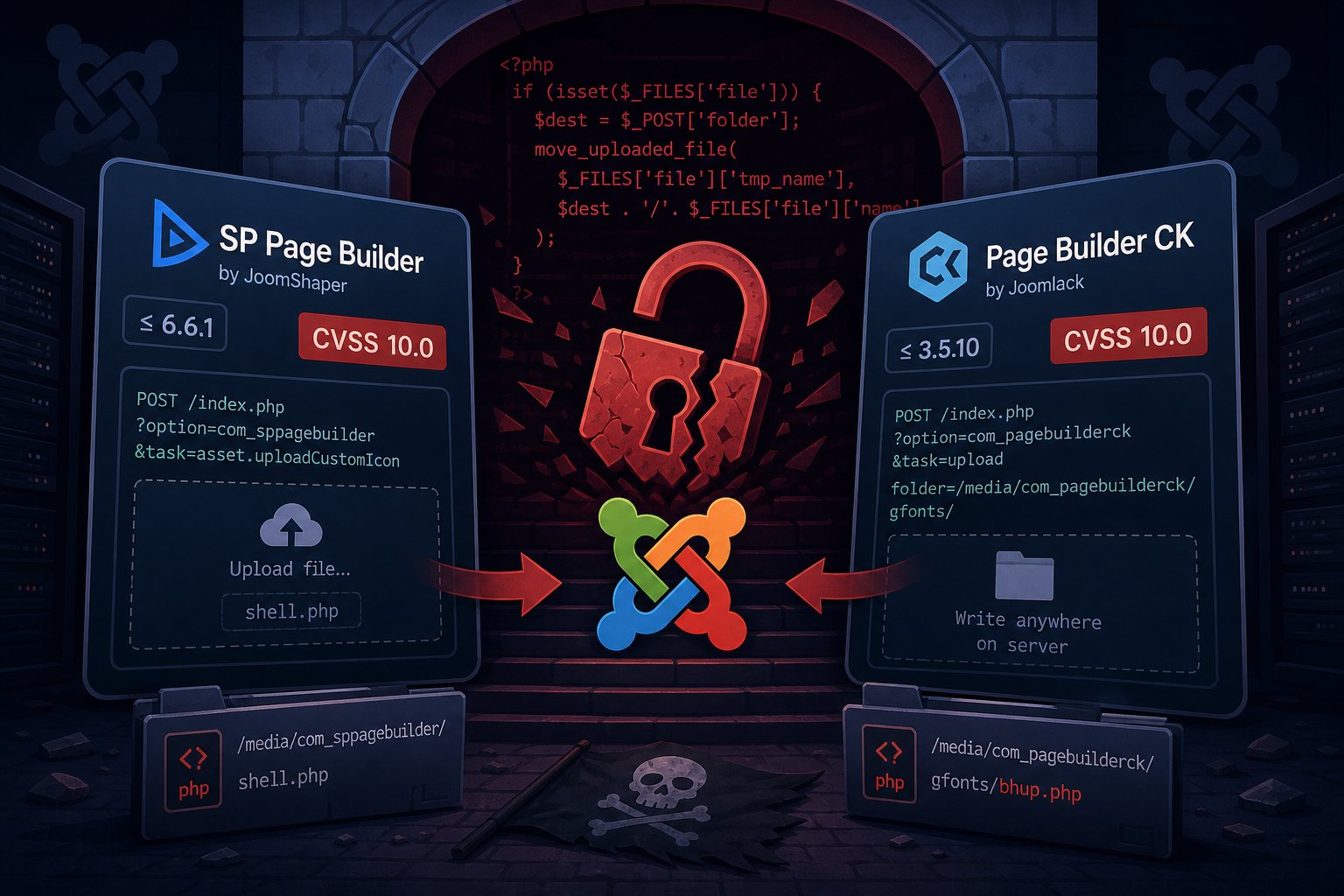
CVE-2026-48908 — SP Page Builder (up to version 6.6.1): The flaw lives in a controller task called asset.uploadCustomIcon, reachable with a simple HTTP POST to index.php?option=com_sppagebuilder&task=asset.uploadCustomIcon. The endpoint accepted multipart file uploads from anyone — no session, no token, no permission check — and placed the uploaded file in a web-served directory. An attacker uploads a PHP web shell and then makes a second request to execute it. The CVE scored 10.0 under both CVSS 3.1 and CVSS 4.0 (the latter's vector explicitly marks exploitation as Active in the wild). A public proof-of-concept is circulating on GitHub. The fix shipped in version 6.6.2 on June 14, 2026.
CVE-2026-56290 — Page Builder CK (up to version 3.5.10): This one is subtler and arguably nastier. The upload handler did verify a CSRF token — but a CSRF token is a public value, retrievable from any page on the site in one unauthenticated request. Once the attacker has that token, the endpoint accepts an upload with no authentication check, and — critically — accepts the destination folder directly from the attacker's POST body. That means files can be written anywhere on the server the web process can reach, not just a designated upload directory. Exploitation was documented within hours of the June 27 patch release. Attackers planted a persistent PHP file manager at /media/com_pagebuilderck/gfonts/bhup.php — a POST-driven uploader that accepts a $_POST['_upl'] field and writes files anywhere on disk, giving a lasting foothold even after the extension itself is patched. Patches are available for Joomla 5 (3.6.0), Joomla 4 (3.4.10), and Joomla 3 (3.1.1).
What Attackers Are Actually Deploying
Post-exploitation patterns are consistent across both vulnerabilities, which suggests automated tooling rather than manual work. Incident responders and researchers have documented the following chain on compromised sites:
- A web shell or PHP file manager is uploaded via the vulnerable endpoint and given an innocuous-looking filename or path.
- The attacker reads
configuration.phpto harvest database credentials and Joomla's secret key. - Hidden Super Administrator accounts are created — look for email addresses ending in
@secure.localand generic usernames likewebeditor,portaladmin, orsysadminfollowed by digits. - Additional persistent PHP backdoors are planted in multiple directories to survive extension removal: watch
/images/<random>/fonts/and/media/com_admin/for unexpected.phpfiles.
The initial access is opportunistic — automated scanners probing every Joomla site reachable on the internet — but once a shell is in, the follow-on access is deliberate.
How to Know If You're Affected
First, confirm whether either extension is installed. From your Joomla admin panel, go to System → Extensions → Manage and search for “SP Page Builder” and “Page Builder CK.” Check the installed version number against the patched versions above.
Even if you patch today, check for signs of prior compromise:
- Audit Users → Manage Users for any Super Administrator accounts you didn't create, especially those with
@secure.localemail addresses. - Search your file system for unexpected
.phpfiles inside/media/com_sppagebuilder/,/media/com_pagebuilderck/,/images/subdirectories, and/media/com_admin/. - Review your web server access logs for POST requests to
asset.uploadCustomIcon(SP Page Builder) or to the Page Builder CK upload endpoint. Any HTTP 200 on those endpoints followed by a GET to a file that didn't previously exist is a confirmed hit. - Check for the specific backdoor file
/media/com_pagebuilderck/gfonts/bhup.phpif you run Page Builder CK.
What to Do Right Now
The patch step is non-negotiable and should happen immediately:
- SP Page Builder: Update to version 6.6.2 or later via the Joomla Extension Manager or from JoomShaper's download portal.
- Page Builder CK: Update to 3.6.0 (Joomla 5), 3.4.10 (Joomla 4), or 3.1.1 (Joomla 3) from Joomlack's site.
If you find evidence of compromise, patching alone isn't enough. A web shell that's already on disk survives the extension update. Full recovery means removing every malicious file, deleting unauthorized admin accounts, rotating all Joomla secrets and database passwords, and restoring from a known-clean backup if the timeline of compromise is unclear. At that point you're doing incident response, not maintenance.
If you're running Joomla and don't have a recent clean backup to fall back to, that's the more fundamental problem these exploits are exposing. At Falcon Internet, tested restores are part of every managed hosting plan for exactly this reason — the value of a backup is proven the moment you actually need it.